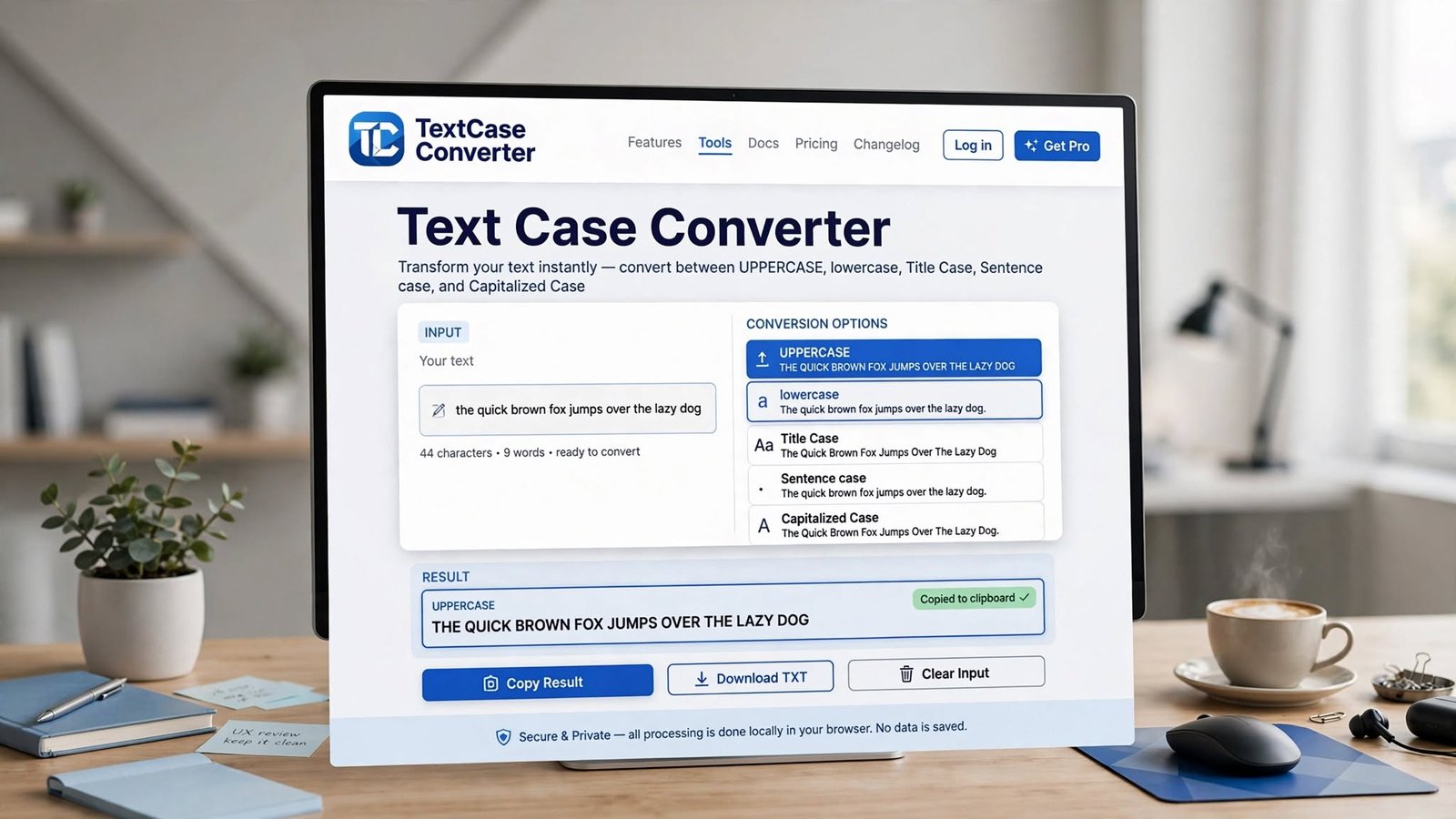
Text Case Converter: The Easy Way to Change Text Formatting Online
How a text case converter works and when upper case, lower case, title case, and sentence case actually matter — with examples for each.
Writing text is easy, but fixing its capital small letters?
But if you have a full paragraph, or full article, or list of 100 product names? Going word by word will drive you crazy and you'll still make mistakes.
That's why I use Text Case Converter. Simple tool, saves so much time.
What is it actually?
It's a tool that changes capital/small letters of your text without you rewriting.
Like you have:
THIS IS AN EXAMPLE OF TEXT.
You click lowercase and it becomes:
this is an example of text.
Or click Title Case and it becomes:
This Is An Example Of Text.
Words same, only capital small changes. That's it.
Instead of editing every letter yourself, you paste and click. Done.
Why text case matters?
Different places need different cases.
Headlines often use Title Case.
Normal paragraph uses Sentence case.
Usernames, URLs need lowercase.
Buttons, warnings sometimes use UPPERCASE.
File names have their own rules.
Product lists need same formatting everywhere.
Correct case makes content look clean and professional.
Common cases - I use these daily
UPPERCASE
Every letter becomes capital.
welcome to our website -> WELCOME TO OUR WEBSITE
I use for headings, labels, warning messages, short promo text. But don't use for long paragraphs, no one will read full uppercase paragraph comfortably.
lowercase
Every letter small.
WELCOME TO OUR WEBSITE -> welcome to our website
Useful for usernames, URLs, some coding stuff, cleaning messy text that came in all caps.
Title Case
Main words capital in heading.
how to create a professional website -> How To Create A Professional Website
Used for article titles, headings, book titles, product names. But note - different style guides have different rules for small words like "of", "and", "to". Some keep them small, some capital. So check your publishing style if you need exact.
Sentence case
First letter of each word capital.
online text formatting tool -> Online Text Formatting Tool
Useful for some headings and lists, but not same as proper Title Case rules.
How does it work?
Super simple.
You paste text in box. Software checks characters and applies rule.
If you select UPPERCASE, it converts small letters to capital.
If lowercase, capital to small.
More advanced options check spaces, full stops, sentence boundaries to know where to capital.
Happens instantly in browser. No waiting.
How to use? My steps
Step 1 - Copy your text. Could be sentence, paragraph, full article, list.
Step 2 - Paste in converter input box. Good tool allows big text, not just small.
Step 3 - Choose case you need. UPPERCASE, lowercase, Sentence case, Title Case, Capitalized Case.
Step 4 - Check result quickly, see if looks correct.
Step 5 - Copy converted text and use wherever.
Literally 10 seconds work.
Benefits - why I love it
Saves time - changing caps manually for big document takes forever, tool does instantly.
Consistency - manual editing you might miss some words, converter applies same rule everywhere.
No repetitive work - changing thousands of letters one by one is useless when tool can do.
Easy for anyone - no technical knowledge needed, paste and click.
Useful for everything - writing, coding, marketing, education, office work.
For bloggers
Bloggers deal with titles, headings, descriptions, big content.
Sometimes content copied from other app has weird caps:
10 BEST Tips FOR Creating a Website
Converter helps normalize it quickly.
Makes editing faster and content looks consistent.
But always review titles after converting because Title Case rules vary by style.
For students
Students making assignments, notes, presentations.
Accidentally typed full heading in uppercase or lowercase? Instead of deleting and retyping, just convert.
Saves time during document prep.
Also useful when you copy text from websites that has messy caps, you can clean it.
For developers
Devs sometimes need specific case for variable names, database values, config labels.
Basic case converter handy for quick jobs, though for complex code transformations specialized tools better.
You paste small piece, convert, copy back without opening heavy software.
For social media
Social media managers make captions, headings, promo messages.
Sometimes you need uppercase for short announcement:
And below description in normal sentence case.
Converter makes these changes quickly.
For long text - biggest advantage
Best part is it can handle big blocks, not just one sentence.
You have long article, you can paste full content and convert in one click.
Instead of changing each sentence manually.
But still review longer results because automatic detection may not understand abbreviations, names, special terms perfectly.
Limitations - need human check
Automatic is good but not perfect.
Proper nouns - like names. Converter may make "Ali" to "ali" in lowercase mode, but name should be capital.
Brand names with unusual caps - like eBay, iPhone - converter will mess them.
Technical terms, acronyms, code - may get changed wrong.
So treat it as assistant, not replacement for final proofreading. Quick check after converting.
Manual vs converter
Manual gives full control over every letter, but slow for big content.
Converter gives speed and consistency.
Best approach depends.
Short sentence with special caps needs manual.
Long document that just needs general case change - converter saves hours.
Privacy - be careful
Some converters process in browser itself, some send to server.
If you're working with confidential info - private business doc, passwords, personal records - don't paste into random online tool unless you trust it and know its privacy policy.
For normal public text like heading or paragraph draft, less worry.
What makes a good converter?
For me good one should have:
Big input area
Many case options
One click conversion
Easy copy button
Clear output
Mobile friendly
Fast
Can handle long text
Simple clean interface, no ads everywhere
Extra features like word count, character count, clear button, download option makes it even better.
On mobile
Nowadays we work from phones too.
Good responsive converter allows you to paste from mobile browser and convert without laptop.
Buttons big enough, text readable, input area comfortable on small screen. Then quick formatting anywhere.
Quick FAQ
What is Text Case Converter? Tool that changes capitalization to uppercase, lowercase, Sentence case, Title Case etc.
Can convert uppercase to lowercase? Yes, lowercase option does.
Can convert lowercase to uppercase? Yes, UPPERCASE option.
What is Title Case? Capitalizes words in title according to tool's rules / style guide.
Can convert full paragraph? Yes, most tools handle paragraphs and big blocks.
Does it change words? No, normally only caps, not wording. But review because names, acronyms may need manual fix.
Can use on phone? Yes, browser based works on phones if site mobile optimized.
Final thoughts
Changing caps manually is okay for few words, but for big content it becomes surprisingly time consuming.
Text Case Converter makes it much faster by auto transforming into different styles. Whether you need UPPERCASE, lowercase, Sentence case, Title Case - it does in one click.
Writers use for articles, students for assignments, developers for technical text, marketers for promo.
Most important - review final result when text has names, brands, abbreviations, special terms. Automatic tools save time, but quick human check ensures final text exactly how you want.
For everyday formatting, well-designed converter is small but very useful tool that makes working with digital text so much easier.
Jobnix Editorial Team — part of Jobnix Tools, we write and review practical guides for the free tools on this website, so you can use them with confidence.